
Zero-Downtime Postgres Migrations on Supabase
Ship Supabase Postgres schema changes without downtime using the expand/contract pattern, batch backfills, lock timeouts, RLS-safe rollouts, and GitHub Actions CI.
Zero-Downtime Postgres Migrations on Supabase#
Database migrations feel harmless when your app is small. You add a column, change a type, rename a field, push to production, and everything works.
Then you get real users.
Now a migration can break live traffic in three different ways:
- Old Vercel functions are still running while new code is deploying.
- Postgres takes a lock that blocks reads or writes on a hot table.
- Supabase RLS policies, generated TypeScript types, or API assumptions change before the app is ready.
Zero downtime means users keep reading and writing while the schema changes underneath them. It does not mean every migration is instant. It means every migration is backward compatible, observable, and reversible enough that a failed deploy does not become an outage.
This guide gives you a production pattern for Supabase Postgres:
- Expand the schema without breaking old code.
- Deploy code that understands both old and new shapes.
- Backfill existing rows in small batches.
- Validate constraints without blocking normal traffic.
- Switch reads and writes to the new shape.
- Contract the old schema in a later release.
- Gate all of it in CI.
If you already read the general Supabase migration strategies guide, this is the operational playbook. It is narrower, more opinionated, and built for production rollouts.
The Mental Model#
In a zero-downtime release, database schema and application code move at different speeds.
On Vercel, a production deploy is a rolling change. Some requests can still hit old serverless functions while other requests hit the new build. Supabase Postgres is shared by both. That means the database must support both versions for a while.
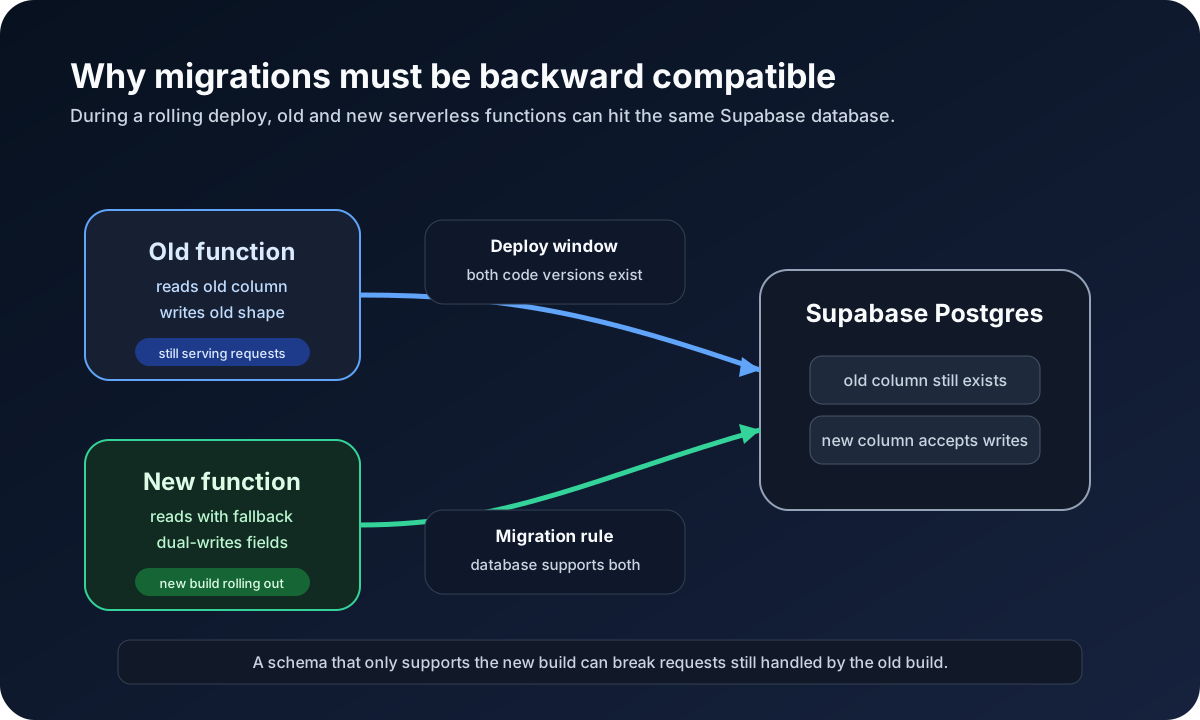
Use this sequence:
| Phase | Database | Application | Goal | | --- | --- | --- | --- | | Expand | Add new nullable columns, tables, policies, indexes | Old code still works | Add capacity for the new behavior | | Bridge | Keep old and new fields in sync | New code writes both, reads with fallback | Make both versions safe | | Backfill | Fill old rows gradually | Code tolerates mixed data | Move historical data | | Validate | Add or validate constraints | Code handles validation failures | Prove data is safe | | Switch | Read from the new shape | New code no longer depends on old shape | Complete behavior change | | Contract | Drop old columns, triggers, policies | Only new code exists | Clean up debt |
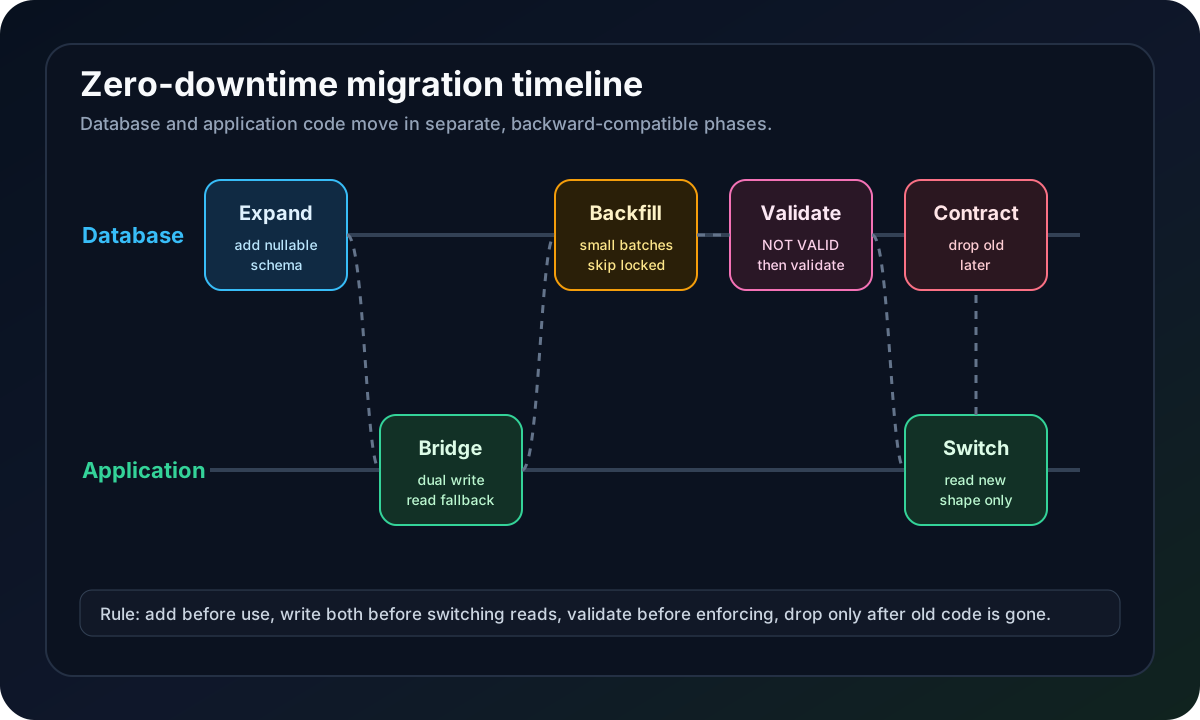
The important rule: do not expand and contract in the same release.
A destructive migration is not a migration. It is a coordinated product rollout. Treat it that way.
Supabase Migration Workflow#
Supabase migrations are SQL files in supabase/migrations. Create them with the CLI:
npx supabase migration new add_account_billing_state
Apply and test locally:
npx supabase start
npx supabase db reset
For remote projects, Supabase tracks applied migrations in supabase_migrations.schema_migrations. Use a dry run before production:
npx supabase db push --dry-run
And inspect history when something feels off:
npx supabase migration list --linked
Two rules keep teams out of trouble:
- Do not change production schema through the Table Editor or SQL Editor once migrations own the schema.
- Do not edit a migration file after it has been applied to a shared environment.
If remote history and local files drift, use supabase migration repair deliberately. Do not "fix" drift by deleting migrations until production happens to accept the next push.
Set Lock and Statement Timeouts#
Every production migration should fail quickly when it cannot get a lock. A blocked migration can block app traffic, and a blocked app can turn into a support incident.
Start risky migration files with timeouts:
set lock_timeout = '5s';
set statement_timeout = '5min';
lock_timeout limits how long Postgres waits to acquire a lock. statement_timeout limits total execution time for a statement. The exact values depend on the table, but the philosophy is consistent: a migration that cannot acquire a safe lock should fail, not wait behind user traffic forever.
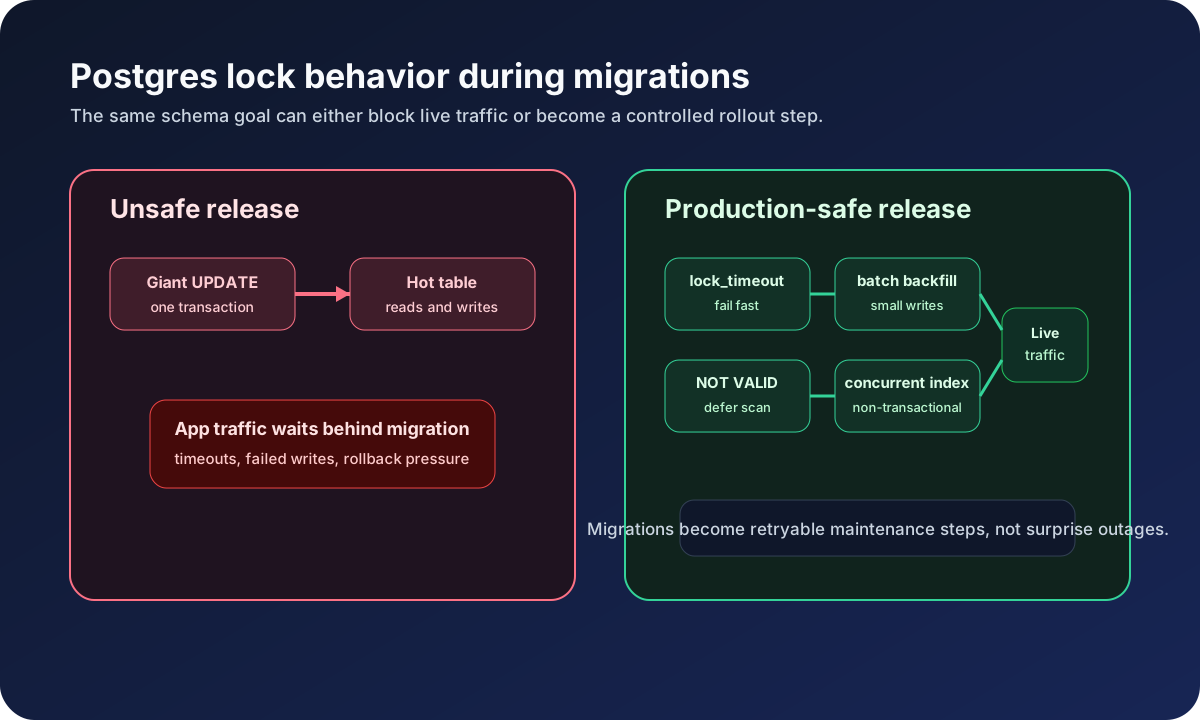
For large backfills, do not run one huge UPDATE. Use batches. More on that below.
Safe Change 1: Add a New Nullable Column#
Adding a nullable column is the safest expand migration.
set lock_timeout = '5s';
set statement_timeout = '2min';

alter table public.accounts
  add column if not exists billing_status text;
Old code ignores the column. New code can start writing it. Existing rows are null, so reads must tolerate missing values.
If you need a default for new rows, set it separately:
alter table public.accounts
  alter column billing_status set default 'trialing';
Postgres can add a column with a constant default efficiently on modern versions, but volatile defaults and generated columns can still rewrite the table. When in doubt on a hot table, add the column first, backfill, then set defaults and constraints later.
Safe Change 2: Rename a Column#
The dangerous version:
alter table public.profiles rename column name to display_name;
That can break old code instantly. A live app may still read name, while new code reads display_name. The safer expand/contract pattern takes multiple releases.
Release 1: Expand#
set lock_timeout = '5s';
set statement_timeout = '2min';

alter table public.profiles
  add column if not exists display_name text;
Release 2: Bridge in App Code#
New writes should fill both columns:
await supabase
  .from('profiles')
  .update({
    name: input.displayName,
    display_name: input.displayName,
  })
  .eq('id', userId)
Reads should prefer the new column but tolerate old rows:
const profileName = profile.display_name ?? profile.name ?? 'Someone'
Release 3: Backfill#
Create a batch function:
create or replace function public.backfill_profile_display_names(batch_size integer default 1000)
returns integer
language plpgsql
security definer
set search_path = public
as $$
declare
  updated_count integer;
begin
  with batch as (
    select id
    from public.profiles
    where display_name is null
      and name is not null
    order by id
    limit batch_size
    for update skip locked
  )
  update public.profiles p
  set display_name = p.name
  from batch
  where p.id = batch.id;

  get diagnostics updated_count = row_count;
  return updated_count;
end;
$$;
Run it repeatedly from a script, admin route, or scheduled job until it returns 0:
select public.backfill_profile_display_names(1000);
FOR UPDATE SKIP LOCKED lets concurrent workers avoid fighting over the same rows. Keep batches small enough that each transaction is boring.
Release 4: Validate#
Before you make the new column required, prove the data is ready:
select count(*) as missing_display_names
from public.profiles
where display_name is null;
Then add a check constraint without immediately validating existing rows:
alter table public.profiles
  add constraint profiles_display_name_present
  check (display_name is not null)
  not valid;
Validate in a separate migration:
alter table public.profiles
  validate constraint profiles_display_name_present;
Postgres still scans the table during validation, but it uses a less aggressive lock than adding the constraint in the fully validated form up front.
Release 5: Contract#
Only after old code is gone:
set lock_timeout = '5s';
set statement_timeout = '2min';

alter table public.profiles
  drop column if exists name;
This cleanup can wait weeks. Shipping cleanup late is cheaper than causing downtime early.
Safe Change 3: Add a Required Foreign Key#
Foreign keys on large tables can be expensive if you validate them immediately. Use NOT VALID first.
set lock_timeout = '5s';
set statement_timeout = '5min';

alter table public.orders
  add column if not exists customer_id uuid;

alter table public.orders
  add constraint orders_customer_id_fkey
  foreign key (customer_id)
  references public.customers(id)
  not valid;
Now backfill customer_id. Once old rows are clean:
alter table public.orders
  validate constraint orders_customer_id_fkey;
If you later need customer_id to be non-null, use the same staged pattern:
alter table public.orders
  add constraint orders_customer_id_present
  check (customer_id is not null)
  not valid;

alter table public.orders
  validate constraint orders_customer_id_present;
Then set NOT NULL in a small final migration after you have measured that it completes quickly:
set lock_timeout = '5s';
set statement_timeout = '2min';

alter table public.orders
  alter column customer_id set not null;
If that lock cannot be acquired in production, it should fail. The validated check constraint still protects data while you retry during a lower-traffic window.
Safe Change 4: Change a Column Type#
Changing a column type in place can rewrite the table and rebuild indexes. For hot tables, use a new column.
Example: moving from text status values to a stricter enum.
create type public.invoice_status as enum (
  'draft',
  'open',
  'paid',
  'void',
  'uncollectible'
);

alter table public.invoices
  add column if not exists status_v2 public.invoice_status;
Bridge writes:
const statusV2 = normalizeInvoiceStatus(input.status)

await supabase
  .from('invoices')
  .update({
    status: input.status,
    status_v2: statusV2,
  })
  .eq('id', invoiceId)
Backfill:
create or replace function public.backfill_invoice_status_v2(batch_size integer default 1000)
returns integer
language plpgsql
security definer
set search_path = public
as $$
declare
  updated_count integer;
begin
  with batch as (
    select id
    from public.invoices
    where status_v2 is null
    order by id
    limit batch_size
    for update skip locked
  )
  update public.invoices i
  set status_v2 = case lower(i.status)
    when 'draft' then 'draft'::public.invoice_status
    when 'open' then 'open'::public.invoice_status
    when 'paid' then 'paid'::public.invoice_status
    when 'void' then 'void'::public.invoice_status
    else 'uncollectible'::public.invoice_status
  end
  from batch
  where i.id = batch.id;

  get diagnostics updated_count = row_count;
  return updated_count;
end;
$$;
Switch reads to status_v2, keep the old status column until you are certain no old code writes it, then contract.
Safe Change 5: Create Large Indexes#
Postgres regular index creation can block writes. CREATE INDEX CONCURRENTLY avoids blocking inserts, updates, and deletes, but PostgreSQL forbids it inside a transaction block.
That matters because migration runners differ in how they execute SQL files.
For small tables or new tables, a normal index inside a migration is fine:
create index if not exists orders_tenant_created_at_idx
  on public.orders (tenant_id, created_at desc);
For a large hot table, run the concurrent index through a non-transactional path such as a carefully controlled psql maintenance step:
psql "$DATABASE_URL" \
  -v ON_ERROR_STOP=1 \
  -c "set lock_timeout = '5s'" \
  -c "set statement_timeout = '30min'" \
  -c "create index concurrently if not exists orders_tenant_created_at_idx on public.orders (tenant_id, created_at desc)"
Keep it as its own deployment step. Do not hide it inside an unrelated app deploy. If it fails halfway, inspect invalid indexes before retrying:
select
  schemaname,
  relname as table_name,
  indexrelname as index_name
from pg_stat_user_indexes
join pg_index on pg_index.indexrelid = pg_stat_user_indexes.indexrelid
where not pg_index.indisvalid;
Then drop the invalid index concurrently and retry:
drop index concurrently if exists public.orders_tenant_created_at_idx;
RLS Changes Are Schema Changes#
RLS policy edits can break production just as hard as column changes. Treat policies as part of the expand/contract rollout.
Suppose you are moving from user-owned rows to organization-owned rows.
Expand#
Add the new column and membership policy path:
alter table public.projects
  add column if not exists organization_id uuid;

create policy "Members can read organization projects"
on public.projects
for select
using (
  exists (
    select 1
    from public.memberships
    where memberships.organization_id = projects.organization_id
      and memberships.user_id = auth.uid()
  )
);
Do not drop the old policy yet:
-- Keep this until all rows have organization_id and app reads use org scope.
-- create policy "Users can read own projects" ...
Bridge#
New code writes organization_id, but old rows may still rely on user_id. Reads should scope by organization when available and fall back only where explicitly intended.
Contract#
After backfill and app rollout:
drop policy if exists "Users can read own projects" on public.projects;
Before contract, run role-impersonation tests. This is a perfect companion to the Supabase RLS policy design guide.
Type Generation Timing#
Generated types can accidentally force a breaking change too early.
The safe sequence:
- Add expand migration.
- Generate types.
- Update app code to accept both old and new fields.
- Deploy.
- Backfill and validate.
- Switch code to new field.
- Contract old schema.
- Generate types again and remove old field references.
Generate Supabase types after migrations are applied to the environment you are targeting:
npx supabase gen types typescript --linked > src/types/database.types.ts
In CI, fail if generated types drift from committed types:
npx supabase gen types typescript --linked > /tmp/database.types.ts
diff -u src/types/database.types.ts /tmp/database.types.ts
That catches the class of bug where a developer changes schema locally but forgets to commit regenerated types.
GitHub Actions CI#
This workflow has three jobs:
- Lint and test the app.
- Validate local migrations by resetting a local Supabase stack.
- Dry-run and push migrations to production only on
main.
name: Supabase Production Migrations

on:
  pull_request:
  push:
    branches:
      - main

jobs:
  app-tests:
    runs-on: ubuntu-latest
    steps:
      - uses: actions/checkout@v4

      - uses: actions/setup-node@v4
        with:
          node-version: 22
          cache: npm

      - run: npm ci
      - run: npm run lint
      - run: npm test -- --runInBand

  migration-tests:
    runs-on: ubuntu-latest
    steps:
      - uses: actions/checkout@v4

      - uses: supabase/setup-cli@v1
        with:
          version: latest

      - run: supabase start
      - run: supabase db reset
      - run: supabase migration list --local

  deploy-migrations:
    if: github.ref == 'refs/heads/main'
    needs:
      - app-tests
      - migration-tests
    runs-on: ubuntu-latest
    environment: production
    concurrency:
      group: production-supabase-migrations
      cancel-in-progress: false

    steps:
      - uses: actions/checkout@v4

      - uses: supabase/setup-cli@v1
        with:
          version: latest

      - name: Link Supabase project
        run: supabase link --project-ref "$SUPABASE_PROJECT_ID"
        env:
          SUPABASE_ACCESS_TOKEN: ${{ secrets.SUPABASE_ACCESS_TOKEN }}
          SUPABASE_DB_PASSWORD: ${{ secrets.SUPABASE_DB_PASSWORD }}
          SUPABASE_PROJECT_ID: ${{ secrets.SUPABASE_PROJECT_ID }}

      - name: Dry-run migrations
        run: supabase db push --dry-run --password "$SUPABASE_DB_PASSWORD"
        env:
          SUPABASE_ACCESS_TOKEN: ${{ secrets.SUPABASE_ACCESS_TOKEN }}
          SUPABASE_DB_PASSWORD: ${{ secrets.SUPABASE_DB_PASSWORD }}

      - name: Push migrations
        run: supabase db push --password "$SUPABASE_DB_PASSWORD"
        env:
          SUPABASE_ACCESS_TOKEN: ${{ secrets.SUPABASE_ACCESS_TOKEN }}
          SUPABASE_DB_PASSWORD: ${{ secrets.SUPABASE_DB_PASSWORD }}
Use a GitHub environment approval for production. Schema changes deserve a human checkpoint, especially when they touch hot tables.
For a full deployment pipeline, pair this with the Next.js and Supabase CI/CD guide.
Downloadable Assets#
Use the checklist version when you want this process in a pull request template, runbook, or team migration review:
- Download the zero-downtime Supabase migration checklist
- Copy the complete expand/contract SQL example
- Copy the resumable batch backfill script
- Copy the GitHub Actions migration workflow
- Copy the migration safety check script
- Browse the full example kit
The article examples are intentionally copy/pasteable: the safe rename rollout, batch backfill function, NOT VALID constraint flow, concurrent index maintenance command, and GitHub Actions workflow can each stand alone in a real repo.
Add a Migration Safety Linter#
You can catch dangerous SQL with a small script before it reaches production.
// scripts/check-migrations.js
import fs from 'node:fs'
import path from 'node:path'

const migrationsDir = path.join(process.cwd(), 'supabase/migrations')
const riskyPatterns = [
  {
    pattern: /\bdrop\s+column\b/i,
    message: 'DROP COLUMN must be a contract migration with a rollback note.',
  },
  {
    pattern: /\brename\s+column\b/i,
    message: 'RENAME COLUMN is not safe for rolling deploys. Use expand/contract.',
  },
  {
    pattern: /\balter\s+column\b[\s\S]*\bset\s+not\s+null\b/i,
    message: 'SET NOT NULL needs backfill plus validation proof.',
  },
  {
    pattern: /\bcreate\s+index\s+(?!concurrently)/i,
    message: 'Large-table indexes should use a reviewed index plan.',
  },
]

let failed = false

for (const fileName of fs.readdirSync(migrationsDir)) {
  if (!fileName.endsWith('.sql')) continue

  const fullPath = path.join(migrationsDir, fileName)
  const sql = fs.readFileSync(fullPath, 'utf8')

  for (const rule of riskyPatterns) {
    if (rule.pattern.test(sql)) {
      console.error(`${fileName}: ${rule.message}`)
      failed = true
    }
  }
}

if (failed) process.exit(1)
Add it to CI:
- run: node scripts/check-migrations.js
This script is intentionally conservative. It should start conversations, not replace review. Add an allowlist comment convention if your team needs exceptions:
-- migration-safety-reviewed: contract release 2026-05-23
alter table public.profiles drop column if exists name;
Rollback Strategy#
Most production database rollbacks should be forward fixes, not time travel.
Use this order:
- Roll back application code first.
- Keep expand migrations in place if they are backward compatible.
- Stop backfill workers if they are causing load.
- Add a forward migration to restore compatibility if needed.
- Use backups or point-in-time recovery only for disaster recovery.
Example: a new app release starts reading display_name, but a subset of rows were not backfilled. Roll back the app to read display_name ?? name, stop the release, run the missing backfill, then redeploy.
Do not drop the new column as your first move. Dropping data to roll back code is how a recoverable deploy turns into a data incident.
Supabase backups are your emergency option. Daily backups and point-in-time recovery are operational safety nets, but restore operations can involve downtime and data loss windows. They are not a normal deploy rollback mechanism.
Migration Safety Checklist#
Copy this into the pull request description for any production migration, or use the downloadable checklist as a reusable PR template:
## Migration Safety Checklist

- [ ] This migration has been tested with `supabase db reset`.
- [ ] This migration has been dry-run against the target project.
- [ ] The app code is backward compatible with the old and new schema.
- [ ] This migration does not rename or drop columns needed by the current deploy.
- [ ] Hot-table operations use `lock_timeout` and `statement_timeout`.
- [ ] Large backfills run in batches, not one giant `UPDATE`.
- [ ] New foreign keys or checks use `NOT VALID` before validation.
- [ ] Large indexes have a reviewed concurrent index plan.
- [ ] RLS policies support both old and new access paths during rollout.
- [ ] Supabase generated types are updated in the same PR when needed.
- [ ] Rollback plan is documented.
- [ ] Monitoring owner is named for the deploy window.
For higher-risk migrations, add two more lines:
- [ ] We confirmed the latest usable backup or PITR restore point.
- [ ] We rehearsed the rollback in staging.
Example Rollout: Add Team Billing#
Here is the complete expand/contract pattern in one realistic feature.
You are moving billing from individual users to organizations. Existing tables have user_id. New billing tables need organization_id.
Migration 1: Expand#
set lock_timeout = '5s';
set statement_timeout = '5min';

alter table public.subscriptions
  add column if not exists organization_id uuid;

alter table public.subscriptions
  add constraint subscriptions_organization_id_fkey
  foreign key (organization_id)
  references public.organizations(id)
  not valid;

create index if not exists subscriptions_organization_id_idx
  on public.subscriptions (organization_id);
Deploy 1: Bridge#
New code writes both:
await supabase.from('subscriptions').insert({
  user_id: userId,
  organization_id: organizationId,
  stripe_customer_id: customerId,
  status: 'trialing',
})
Reads use the new organization scope when present, but old rows still work:
const query = supabase
  .from('subscriptions')
  .select('*')
  .or(`organization_id.eq.${organizationId},user_id.eq.${userId}`)
Backfill#
create or replace function public.backfill_subscription_organizations(batch_size integer default 500)
returns integer
language plpgsql
security definer
set search_path = public
as $$
declare
  updated_count integer;
begin
  with batch as (
    select s.id, m.organization_id
    from public.subscriptions s
    join public.memberships m on m.user_id = s.user_id
    where s.organization_id is null
    order by s.id
    limit batch_size
    for update skip locked
  )
  update public.subscriptions s
  set organization_id = batch.organization_id
  from batch
  where s.id = batch.id;

  get diagnostics updated_count = row_count;
  return updated_count;
end;
$$;
Run:
select public.backfill_subscription_organizations(500);
Migration 2: Validate#
set lock_timeout = '5s';
set statement_timeout = '10min';

alter table public.subscriptions
  validate constraint subscriptions_organization_id_fkey;

alter table public.subscriptions
  add constraint subscriptions_organization_id_present
  check (organization_id is not null)
  not valid;

alter table public.subscriptions
  validate constraint subscriptions_organization_id_present;
Deploy 2: Switch#
Now reads use only organization_id. Keep user_id writes for one more deploy if old code may still exist.
Migration 3: Contract#
set lock_timeout = '5s';
set statement_timeout = '2min';

alter table public.subscriptions
  drop constraint if exists subscriptions_organization_id_present;

alter table public.subscriptions
  alter column organization_id set not null;

alter table public.subscriptions
  drop column if exists user_id;
This final migration is intentionally boring because all the risky work happened earlier.
What Not to Do#
Avoid these in live Supabase projects:
- Renaming a column in the same deploy that changes app code.
- Dropping a column because TypeScript no longer references it.
- Running one giant backfill update on a hot table.
- Adding a foreign key to a large table without
NOT VALID. - Adding strict RLS policies before data and code are ready.
- Trusting local migration success as proof of production safety.
- Using a backup restore as a normal rollback plan.
The most dangerous migrations are the ones that look clean in a diff.
Reference Docs#
Keep these open while designing production migrations:
- Supabase database migrations
- Supabase CLI reference for db push, db diff, and migration repair
- Supabase deployment and branching
- Supabase database backups and PITR
- PostgreSQL ALTER TABLE
- PostgreSQL CREATE INDEX
- Supabase Postgres indexes
The Durable Pattern#
Zero-downtime migrations are mostly discipline.
Add before you use. Write both before you read new. Backfill before you require. Validate before you enforce. Drop only after the old code is gone.
That pattern is slower than a one-line ALTER TABLE. It is also the difference between a routine release and a production incident.
Related Incidents#
These production incidents are directly traceable to the migration patterns covered in this guide:
- INC-009: Migration succeeds in staging and fails in prod — production data volume exposed a lock timeout that staging never triggered
- INC-010: Rollback blocks writes for too long — revert migration acquired a table lock during peak traffic
Adjacent Guides#
- Supabase debugging and DB operations hub
- Supabase Connection Pooling with PgBouncer on Vercel Serverless
- Database Design and Optimization for Next.js and Supabase Applications
Production Notes#
- Root cause to verify: check schema drift, lock risk, generated type drift, and whether old app code can still run during deploy.
- Production fix pattern: use expand/contract migrations, dry-runs, batch backfills, and explicit rollback notes.
- Verification step: run the migration against staging with production-like data volume before touching production.
Frequently Asked Questions
One email a month — no fluff
RLS gotchas, Next.js cache debugging, and the one Supabase setting that bit me last month.
Related Guides

Database Migration Strategies for Next.js and Supabase Production Apps
Complete guide to database migrations in Supabase. Learn zero-downtime deployments, schema versioning, rollback strategies, and production patterns.

Postgres Zero-Downtime Flow Diagram: One-Page Production Guide
A 30-second migration flow reference for zero-downtime PostgreSQL releases.

Supabase Connection Pooling with PgBouncer on Vercel Serverless
Configure Supabase PgBouncer connection pooling for Vercel serverless deployments. Avoid connection exhaustion, choose pool modes, and tune for production scale.